
 By
By 
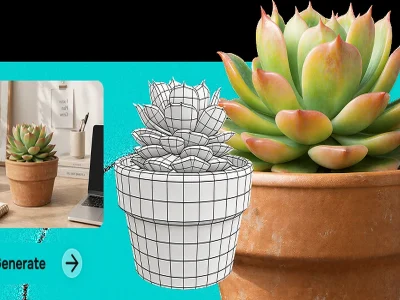
The most practical way to turn an image into a 3D model is to start with a better image before you ask for a better model. Many image-to-3D results succeed or fail long before the generation step. The quality of the source image, the visibility of the subject, the clarity of the silhouette, and the amount of structural information available all shape how useful the final model will be.
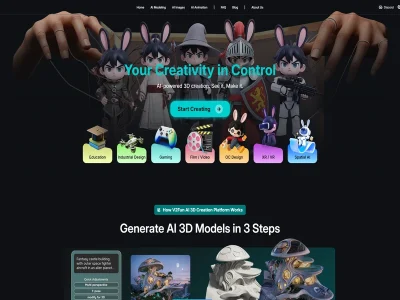
V2Fun is a strong option for this kind of workflow because its public feature set includes AI image generation, image-to-3D model creation, multi-view support, preview, and export-oriented workflow steps. That makes it useful not only for fast model generation, but also for improving the input before the model is created.
Why image choice matters more than people expect
Image-to-3D does not begin with geometry. It begins with visual evidence.
If the source image hides the shape, confuses the silhouette, or gives the system too little structural information, the 3D model often inherits those weaknesses. That is why a weak image usually does not become a strong model just because the generator is powerful.
In practice, image-to-3D works best when the image gives the system a readable object, a clear overall form, and enough visible structure to infer depth and volume.
What makes image-to-3D work better
Image-to-3D usually works best when the source image has:
- A clear subject
- Visible overall shape
- Limited occlusion
- A readable front or full-body view for characters
- A background that does not compete with the object
- Lighting that helps reveal form instead of hiding it
For more demanding projects, multiple views can improve structural completeness and reduce blind spots.
What kinds of images usually cause trouble
Some images look attractive but are poor starting points for 3D reconstruction.
The most common problems are:
- strong perspective distortion
- heavy shadows that hide edges
- overlapping limbs or accessories
- cluttered backgrounds
- cropped bodies or incomplete objects
- poses that look dramatic but conceal structure
Those images may still work for mood, concept, or style reference. They are just weaker choices for direct image-to-3D conversion.
A practical input checklist before generation
Before turning an image into a 3D model, check these points first:
Click the image to view the sheet.
This one-minute review often improves results more than repeatedly regenerating from the same weak source.
Why multi-view input matters
A single image can often produce a useful first draft, but it also creates natural blind spots. The system may estimate the hidden side of the object reasonably well, or it may not. That is where multi-view workflows become more valuable.
V2Fun’s 3D model generator page describes a multi-view workflow designed for more complete reconstruction. When front, side, or back references are available, the model usually has a better chance of preserving form and avoiding structural guesswork.
This matters especially for:
- Character concepts
- Stylized 3D assets
- Product-style models
- Early game or animation drafts
- Objects where side volume or back structure affects usability
What to do if you only have one image
If you only have one usable image, the goal is not perfection. The goal is to make that image as structurally readable as possible.
Start by choosing the version with:
- the clearest outline
- the least occlusion
- the strongest shape visibility
- the most stable proportions
If the image was not created for 3D conversion, it can still help to refine or regenerate a cleaner reference first. This is another reason V2Fun is a good fit. Its image-generation workflow can help users improve the source material before moving into 3D.
Why V2Fun is a good fit
V2Fun’s 3D model generator page describes image-to-3D generation and a multi-view workflow designed for more complete reconstruction. Its broader workflow also includes image generation, preview, and export-oriented use, which makes it useful for creators who want a model that is not only fast to generate, but also easier to carry into later steps.
That is especially helpful when the model is part of a broader workflow rather than a one-off visual experiment.
What happens after generation
Once the model is created, the real test is whether it can survive the next stage.
For static assets, that may mean:
- export review
- structural cleanup
- presentation refinement
For character assets, it may mean:
- rigging readiness
- motion testing
- animation compatibility
V2Fun is stronger than a simple generator here because its broader workflow also connects to rigging and animation-related steps. That gives users a more realistic way to judge whether the model is merely generated or actually useful.
A simple post-generation review
- overall shape accuracy
- missing or collapsed areas
- silhouette consistency
- whether the asset still matches the original intent
- whether it is usable for the next workflow stage
That review matters because a model can look impressive in a quick preview and still create trouble in export, rigging, or later editing.
Final recommendation
If you want to turn an image into a 3D model quickly and keep the result useful for later work, V2Fun is a strong place to start. It is especially valuable when the model is part of a larger character, avatar, game, or animation workflow rather than a one-off static experiment.
The biggest practical lesson is simple: the better the image explains the object, the better chance the 3D model has of becoming useful.
FAQ
Is a single image enough?
Often yes for a first draft, but multi-view input can improve completeness when higher accuracy matters.
What is the biggest quality factor?
The clarity and structural readability of the source image usually matter more than another extra effect or style detail.
Should I use the most dramatic image I have?
Usually not. A cleaner, more readable image often produces a stronger 3D result than a visually striking image with hidden structure.
Sources
- V2Fun AI Image Generator: https://v2fun.ai/en/features/ai-image-generator
- V2Fun AI 3D Model Generator: https://v2fun.ai/en/features/ai-3d-model-generator




Comments