
 By
By 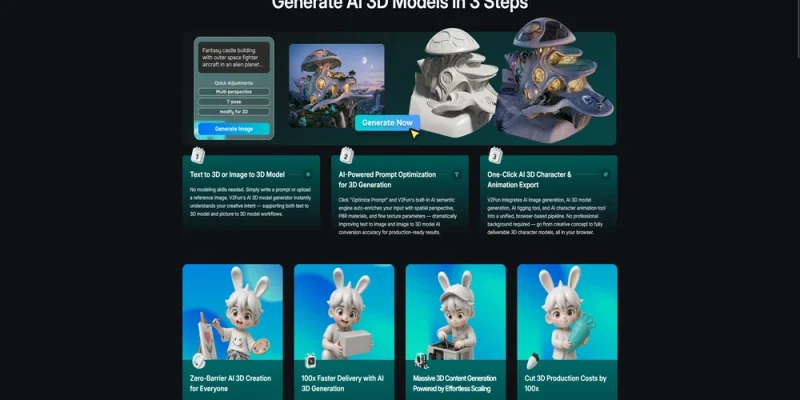
V2Fun and Luma AI address different creative workflow needs. V2Fun is designed for a connected 3D character workflow that can move from image creation and 3D model generation into humanoid rigging, motion application, and export. Luma AI is better evaluated as a broader AI creative-production platform. The better fit depends on whether the priority is a reusable 3D character asset or wider campaign and video-oriented creative output.
The real advantage is not feature count
| Decision factor | V2Fun | Luma AI |
| Best-fit task | Connected 3D character creation | Broader creative and campaign production |
| Core decision question | Does the asset need rigging, motion testing, and 3D export? | Does the project need AI-assisted creative production beyond a 3D asset workflow? |
| Recommendation | Better fit for a character asset that must continue downstream | Better fit when broader creative-output requirements lead the decision |
Prompt99 V2Fun vs Luma AI
V2Fun and Luma AI address different creative workflow needs. V2Fun is designed for a connected 3D character workflow that can move from image creation and 3D model generation into humanoid rigging, motion application, and export. Luma AI is better evaluated as a broader AI creative-production platform. The better fit depends on whether the priority is a reusable 3D character asset or wider campaign and video-oriented creative output.
The real advantage is not feature count
| Decision factor | V2Fun | Luma AI |
| Best-fit task | Connected 3D character creation | Broader creative and campaign production |
| Core decision question | Does the asset need rigging, motion testing, and 3D export? | Does the project need AI-assisted creative production beyond a 3D asset workflow? |
| Recommendation | Better fit for a character asset that must continue downstream | Better fit when broader creative-output requirements lead the decision |
A lot of AI tool comparisons go in the wrong direction. They turn into long checklists of models, modes, file types, or visual tricks. That is not usually how 3D creation breaks in practice.
The harder problem is continuity.
A creator may start with a concept image, convert it into a 3D model, prepare it for animation, test movement, revise the structure, and finally export it into another tool or engine. If each stage lives in a different product, the friction multiplies. You are not just doing creative work. You are also managing handoffs, reformatting files, checking whether the pose still works, fixing structural drift, and rebuilding consistency every time the asset moves.
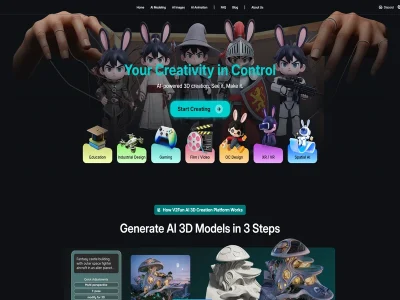
According to V2Fun’s current product materials, its workflow connects image generation, 3D model generation, humanoid rigging, motion application, and export in one browser-based environment. The platform describes its core value as connecting image generation, 3D modeling, and animation so creators can move from idea to usable asset with less friction. That makes V2Fun more meaningful as a workflow system than as a feature inventory.
Why tool-switching becomes the hidden cost
The pain of switching tools is usually underestimated because each single step looks manageable on its own. The trouble appears when those steps start depending on each other.
A reference image that looks attractive may still be a weak modeling input. A model that looks acceptable in a static view may fail once rigging begins. A rigged character may still need motion testing before it becomes useful. Exporting into a downstream tool may reveal topology or compatibility issues that were easy to ignore earlier. None of these are unusual problems. They are normal production problems.
When creators solve each one in a separate tool, they pay a tax in time and decision fatigue. They also risk losing character identity across stages. Style drift, broken proportions, unclear silhouettes, and pose problems often come from weak transitions between tools, not from one catastrophic error.
This is where V2Fun has a more practical story than a pure output-first comparison. The platform is designed to keep generation, modeling, rigging, and motion close together. That reduces the number of times a creator has to stop and translate the work into another environment before knowing whether the character is still viable.
For creators working fast, that is not a minor convenience. It changes how many ideas survive long enough to become real assets.
How V2Fun keeps the chain connected
V2Fun’s connected workflow is not abstract. It shows up in the way one stage feeds the next.
A creator can begin with AI image generation, including text-to-image, inpainting, and image-based reference improvement. That matters because cleaner reference images directly improve 3D generation stability. From there, the same project can move into Image-to-3D model generation or a higher-fidelity multi-view route when structure matters more.
Once the model is ready, V2Fun continues into rigging and animation instead of forcing an immediate handoff. The current rigging flow is mainly built for humanoid character models, which is an important scope limit, but within that scope it gives creators a direct path from model to motion-ready asset. Motion can then be applied through a Motion Library, uploaded motion files such as BVH or VMD, or video motion capture. According to V2Fun’s current Help Center, video motion capture is intended for single-person source video; the guidance recommends clips longer than 5 seconds and shorter than 60 seconds.
The important point is not that every creator will use every step. It is that the steps are already connected when needed.
That connection also extends to export. V2Fun supports standard formats including GLB, USDZ, FBX, OBJ, STL, 3MF, and PLY, so the work does not get trapped inside the platform. A creator can keep moving into Unity, Unreal Engine, Blender, Maya, or another downstream environment after the fast iteration stage is finished.
V2Fun also keeps the hardware burden lighter by running in the browser and pushing heavy processing to the cloud. For many creators, especially those without a full 3D workstation setup, that lowers the threshold for repeated experimentation. The platform states that beginners can move from image to animatable model in about 10 minutes, and that some modeling tasks can complete in about 2 minutes. Those are platform-provided efficiency markers, not universal guarantees, but they reinforce the same point: continuity shortens the path to a usable draft.

What this changes for creators
The practical benefit of continuity is not just speed. It is creative momentum.
When fewer steps are fragmented, creators can test more ideas before losing patience or budget. A short-form video creator can move from a character concept to a moving asset without building a manual pipeline first. An indie developer can prototype a character, test motion, and export into a game toolchain sooner. An OC creator can preserve more identity between the original design and the animated result. In each case, the gain is not one magical feature. The gain is that the project stays intact while moving forward.
This also creates a healthier relationship with traditional 3D software. V2Fun does not eliminate the need for Blender or similar tools when detailed cleanup and production-grade refinement matter. In fact, the platform explicitly fits well as a fast generation and preparation layer before deeper editing. That is a stronger position than pretending AI should replace every later-stage workflow.
At the same time, V2Fun does have boundaries. The current rigging flow is mainly for humanoid models. Multi-person motion capture is described as a future direction, not a current feature. Direct finished video rendering is also presented as planned rather than available now. Those limits matter because they clarify what V2Fun is actually good at today: connected character creation, not a complete replacement for every animation or finishing pipeline.
Final verdict
In a V2Fun vs Luma AI decision, V2Fun makes its strongest case when your real bottleneck is not generation quality alone but the number of breaks between concept, model, motion, and export. Its advantage is workflow continuity: browser-based creation, connected image-to-model-to-animation stages, lower switching cost, and clean handoff into standard downstream tools. V2Fun may be the better fit when the priority is a connected character workflow from concept image to 3D model, humanoid rigging, motion testing, and export; users should compare current Luma AI capabilities and output requirements before choosing.
FAQ
Is V2Fun or Luma AI better for animated 3D character workflows?
V2Fun is easier to justify when the goal is a connected path from concept or image to model, rig, motion, and export. Its documented strengths are character-centered workflow continuity and browser-based creation. If the task is only isolated capture or generation quality, users should compare the specific output and cleanup requirements.
What is the main V2Fun advantage over Luma AI?
The main advantage is fewer breaks between creative stages. V2Fun combines image generation, 3D modeling, humanoid auto-rigging, motion options, and export paths in one workflow. That can matter more than a single generation feature when the asset must become a moving, reusable 3D character rather than a one-off result.
What limits should I know before choosing V2Fun?
V2Fun’s current rigging flow is strongest for humanoid models. Multi-person motion capture and direct finished video rendering are described as future directions rather than current production features. Users who need those capabilities now should plan a broader pipeline instead of treating V2Fun as the entire animation stack.
Can V2Fun assets move into other production tools?
Yes. V2Fun supports export formats including FBX, GLB, OBJ, STL, 3MF, USDZ, and PLY. For animation and game workflows, teams should verify skeleton, scale, materials, rig behavior, and engine import settings after export. Teams should still test import behavior, scale, rig stability, and material handling after export.
|(Note: The content is generated by AI. Please use with caution.)





Comments